



What if the tool designed to save you money is actually costing you more because you don’t know how to use it correctly? That’s a harder question than it sounds, and it’s exactly why so many people feel a knot in their stomach every time they open the Medicare Plan Finder website.
You’re not alone in that feeling. Staring at a long list of plans, wondering if you entered your prescriptions correctly, and trying to make sense of 2026 coverage changes that nobody explained to you — that’s genuinely stressful. It makes complete sense that you’d want a clear, calm walkthrough before you commit to anything.
That’s precisely what this guide delivers. Learning how to use the Medicare Plan Finder tool the right way means more than just clicking through screens. It means walking away with a shortlist of plans you can actually trust, confidence that your doctors and medications are covered, and the peace of mind that you’re not overpaying by a single dollar. We’ll take you through each step, one at a time, so nothing gets missed and nothing feels overwhelming.
Key Takeaways
- Learning how to use the Medicare Plan Finder tool correctly — not just casually — is the difference between finding a plan that truly fits your life and overpaying for one that doesn’t.
- The tool’s “Total Yearly Cost” figure is the single most important number to focus on when comparing 2026 plans, because monthly premiums alone can be deeply misleading.
- Small input mistakes, like skipping your prescriptions or using Guest Search with a complex medication history, can quietly send you toward the wrong plan entirely.
- Your doctors and your specific drug dosages must be verified inside the plan itself — the Plan Finder gives you a starting point, not a final answer.
- When the tool feels like too much, an independent broker with access to 40+ carriers can review your results with you and catch what an algorithm simply cannot.
What is the Medicare Plan Finder Tool and Why Does it Matter in 2026?
The Medicare Plan Finder is the official online portal built and maintained by the Centers for Medicare and Medicaid Services (CMS). Its entire purpose is to give you one place where you can compare Medicare Advantage plans, Part D prescription drug plans, and Medigap options side by side, using your actual location, your actual medications, and your actual doctors. It’s free, it’s government-run, and it’s available at medicare.gov any time you need it.
That definition sounds simple enough. But here’s what most people don’t realize: the tool is only as useful as the information you put into it. Used correctly, it becomes one of the most powerful consumer tools in the entire healthcare space. Used casually, it can quietly point you toward a plan that looks affordable on the surface but costs you far more over the course of a year. Learning how to use the Medicare Plan Finder tool with intention, not just curiosity, is what separates a confident enrollment decision from a stressful one.
The 2026 Annual Enrollment Period runs from October 15 through December 7. Any plan you choose during that window takes effect January 1, 2026. That timeline matters because 2026 brings meaningful changes to Medicare coverage, particularly around Part D prescription costs, and the Plan Finder has been updated to reflect those changes. If you’re relying on last year’s research or a plan you’ve had for several years without reviewing it, you may be working from an outdated picture.
New Features for the 2026 Enrollment Season
CMS has made notable improvements to the Plan Finder interface for 2026. The mobile experience has been redesigned so the tool is genuinely usable on a phone or tablet, not just a desktop. The “Find a Provider” integration is more tightly connected to plan results, making it easier to check whether your specific doctors are in-network before you commit. Perhaps most significantly, the tool now reflects the 2026 Part D out-of-pocket spending structure, including the updated cap that limits how much you pay for covered drugs in a given year. This is a real change that affects how drug costs are displayed and compared across plans, so it’s worth understanding before you start filtering results.
Guest Search vs. Logged-In Search: Which is Best?
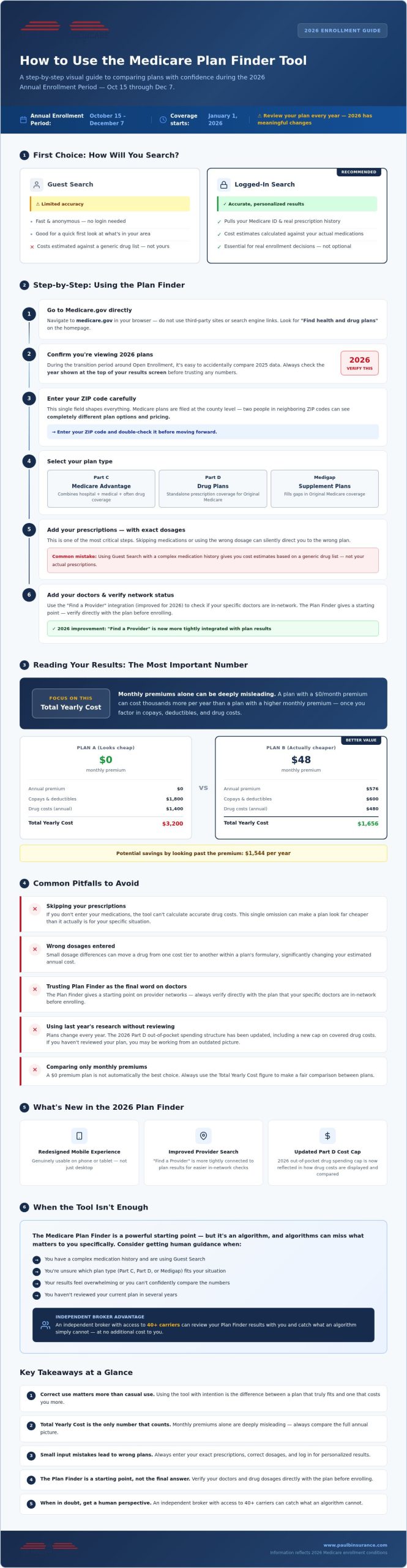
When you arrive at the Plan Finder, you’ll have two options: search as a guest or log in through your MyMedicare.gov account. Guest Search is fast and anonymous. It gives you a general sense of what’s available in your zip code without requiring any personal information. For a quick first look, it works fine.
But if you want numbers you can actually trust, logging in is the better path. A logged-in search pulls in your Medicare ID, your existing coverage details, and your prescription history from Medicare’s records. That means the cost estimates you see are calculated against your real medication list, not a generic placeholder. When you’re trying to figure out how to use the Medicare Plan Finder tool to make a real decision, that level of accuracy isn’t optional. It’s essential.
If setting up a MyMedicare.gov account feels like one more thing to figure out, you’re not alone. An independent broker who works with 40 or more carriers, like the team at The Modern Medicare Agency, can walk through those results with you and make sure nothing important slips through the cracks.
Step-by-Step: How to Use the Medicare Plan Finder Tool
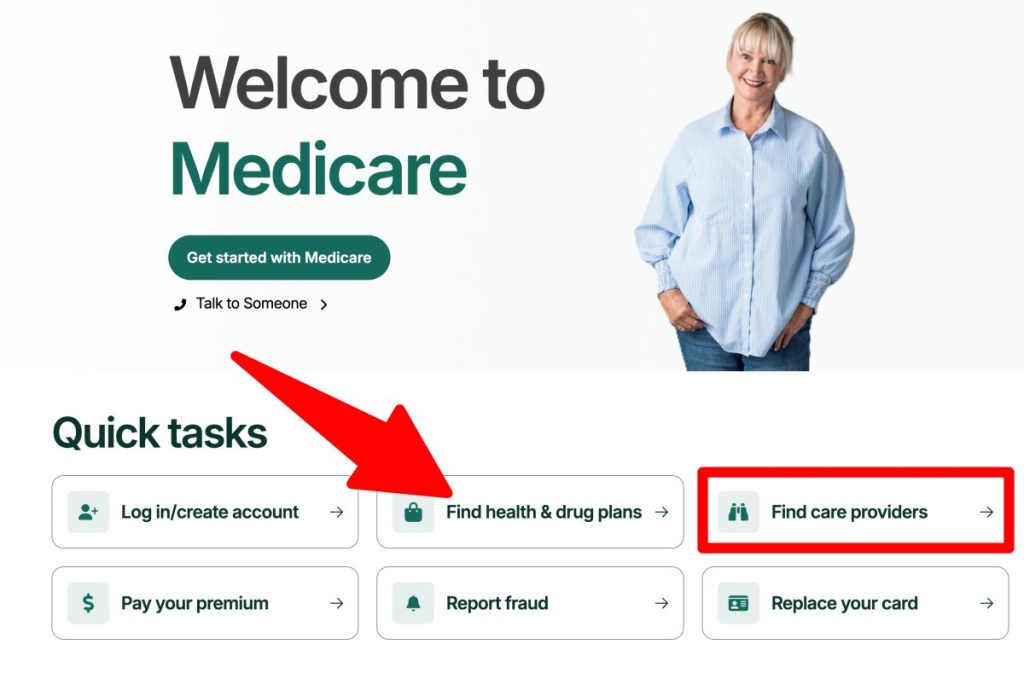
Open your browser and go directly to Medicare.gov. Don’t use a search engine link or a third-party site that mimics the interface. The official government portal is the only place where the data is current, accurate, and tied to real 2026 plan filings. Once you’re there, look for the “Find health and drug plans” option on the homepage. That’s your starting point.
Before anything else, confirm you’re viewing 2026 plans. The tool defaults to the current plan year, but during the transition period around Open Enrollment, it’s easy to accidentally compare 2025 data. Check the year displayed at the top of your results screen before trusting any numbers.
Next, enter your ZIP code. This single field shapes everything that follows. Medicare plans are filed at the county level, so two people in neighboring ZIP codes can see completely different plan options and pricing. Enter yours carefully, and double-check it before moving forward.
Once you’ve confirmed your location, select your plan type. You’ll choose between Medicare Advantage (Part C), Part D drug plans, or Medigap. If you’re unsure which category fits your situation, the Medicare Advantage guide and the Part D overview at Paul Barrett’s site can help you sort that out before you go further.
Don’t skip the “Help with Costs” section. This is where the tool asks whether you qualify for programs like Extra Help (also called the Low Income Subsidy). If you do qualify, the cost estimates you see for Part D plans will reflect your actual subsidized costs, not the standard pricing. Skipping this step when you’re eligible means every number you see afterward is wrong for your situation.
Entering Your Prescription Drugs Accurately
This step is where most people make quiet, costly mistakes. Use the “Find My Prescriptions” feature to search each medication by name. When the results appear, select the exact formulation, dosage strength, and package size your doctor prescribed. A 10mg tablet taken once daily and a 20mg tablet taken every other day may have the same active ingredient but very different costs across plans. Choose the right package size and frequency, then click “Save and Add” to build your complete medication list before comparing any plan results.
Selecting Your Preferred Pharmacies
Pharmacy choice is one of the most underestimated cost factors in the entire comparison process. The same plan can price the same drug very differently depending on where you fill it. The Plan Finder lets you add up to five pharmacies, including local retail locations and mail-order options, so you can see side-by-side cost differences for your specific medications.
Pay close attention to the “Preferred Pharmacy” tag in 2026 results. Plans negotiate lower cost-sharing rates with certain pharmacies, and filling at a preferred location can reduce your out-of-pocket drug costs meaningfully over a full year. If your usual pharmacy doesn’t carry that tag, it’s worth checking whether a nearby alternative does before you finalize anything.
If building out this list feels tedious or you’re unsure whether your inputs are accurate, that’s a reasonable moment to get a second set of eyes. An independent broker with access to 40 or more carriers can review your Plan Finder results and confirm you haven’t missed anything that matters.
Deciphering the Results: How to Compare Plans for 2026
Once your medications and pharmacies are saved, the Plan Finder generates a list of available plans. That list can feel overwhelming at first glance. The key is knowing exactly where to look and what to ignore.
Start with the “Sort By” dropdown at the top of your results. Change it to Lowest Drug + Premium Cost. This setting reorders plans based on the combined weight of your monthly premium and your estimated annual drug costs, which is a far more honest ranking than sorting by premium alone. A plan with a $0 premium and high drug costs will consistently beat a plan with a modest premium and low drug costs in a premium-only sort. That’s a trap. Sorting by drug plus premium cost helps you avoid it.
The single most important number on your results screen is the Total Yearly Cost figure. This is the metric that actually reflects what you’d pay across a full year: premiums, drug copays, deductibles, and other cost-sharing combined into one estimate. Monthly premiums are attention-grabbing, but they’re only one piece of the picture. Two plans with identical $45 monthly premiums can differ by hundreds of dollars annually once your specific medications are factored in. When you’re learning how to use the Medicare Plan Finder tool to make a real decision, Total Yearly Cost is the number to anchor every comparison around.
Don’t stop at the summary card. Click the “Plan Details” link for any plan that interests you. Inside, you’ll find a direct link to the plan’s provider directory, where you can confirm whether your specific doctors are listed as in-network. The tool gives you a starting point, but verifying your physician’s participation directly inside the plan’s own directory is the step that protects you from a costly surprise later.
Pay attention to Medicare Star Ratings in the 2026 results. CMS rates plans on a scale of one to five stars based on quality measures including customer service, member experience, and how well plans manage chronic conditions. A plan rated four stars or higher has demonstrated consistent performance. A plan rated below three stars is worth approaching carefully, regardless of how low its Total Yearly Cost appears.
Understanding the 2026 Part D Spending Cap
One of the most significant changes reflected in the 2026 Plan Finder results is the updated Part D out-of-pocket structure. Under 2026 rules, your out-of-pocket spending on covered drugs is capped at $2,000 for the year. The Plan Finder calculates your estimated costs with this cap applied, which means the Total Yearly Cost figure you see already accounts for the point at which your drug costs stop. To see how each of your medications is categorized, look for the Drug Tier column inside a plan’s detail page. Tier placement determines your copay or coinsurance rate for each drug, and a medication landing on Tier 3 versus Tier 2 can meaningfully shift your annual total. For a deeper explanation of how Part D cost structures work, the Medicare Part D overview is a helpful resource to read alongside your Plan Finder results.
Evaluating Medicare Advantage Extra Benefits
If you’re comparing Medicare Advantage plans, the summary card only tells part of the story. Click into the “Plan Benefits” tab inside the plan’s detail page to find the full picture of supplemental coverage. This is where you’ll see specifics on dental, vision, and hearing benefits, including annual allowances, covered services, and any network restrictions that apply. These benefits vary considerably from plan to plan, and a plan with a strong dental allowance can represent real value if you have regular dental needs. The Medicare Advantage Plans Guide walks through how to weigh these extras against core coverage so you’re not distracted by benefits you won’t actually use.
If any part of this comparison process feels uncertain, that’s a reasonable signal to bring in a second perspective. An independent broker with access to 40 or more carriers, like the team at The Modern Medicare Agency, can review your Plan Finder results and confirm that what you’re seeing reflects your actual situation, not just a close approximation of it. Knowing how to use the Medicare Plan Finder tool is genuinely useful; having someone experienced verify your conclusions is what turns a good decision into a confident one.
Common Pitfalls and Pro-Tips for a Better Search
Knowing how to use the Medicare Plan Finder tool is one thing. Knowing where people quietly go wrong is what actually protects you. The mistakes that cost people the most money aren’t dramatic errors. They’re small, easy-to-miss missteps that look completely fine on the surface.
Here are the ones worth watching for:
- Using Guest Search with a complex medication history. If you take more than two or three prescriptions, Guest Search simply doesn’t have access to your real drug records. It relies entirely on what you manually enter, and a single missed medication or wrong dosage can make an expensive plan look like the cheapest option on the list. Log in. The accuracy difference is significant.
- Assuming your doctor is covered without checking. The Plan Finder summary card may show a plan that looks like a strong match, but it doesn’t confirm your specific physician’s network status. You have to click through to the plan’s own provider directory and search your doctor’s name directly. A plan that doesn’t include your primary care physician isn’t a bargain at any price.
- Skipping the mail-order pharmacy column. Many people fill prescriptions at a local retail pharmacy out of habit. But for maintenance medications you take every month, mail-order pricing through a plan’s preferred pharmacy can reduce your annual drug costs noticeably. The comparison column is right there in your results. Don’t scroll past it.
- Treating your first search as your final answer. CMS updates Plan Finder data on a weekly basis. If you did your research in mid-October and you’re enrolling in late November, log back in and re-run your search. Plan details, formulary changes, and pharmacy tier designations can shift between your first look and your enrollment date.
Why Your ZIP Code Changes Everything
Medicare plans are approved at the county level, not the state level. Two neighbors in the same city but different ZIP codes can see completely different plan options, different premiums, and different provider networks. Enter your ZIP code carefully, and if you split your time between two locations, such as spending winters in Florida and summers in New York, you’ll want to run searches in both locations before deciding. Some Medicare Advantage plans restrict coverage to a defined service area, which matters a great deal if you’re regularly in two states. The Medicare Eligibility guide covers the rules around coverage when you move or maintain multiple residences.
The Importance of the Star Rating in 2026
Star Ratings measure quality, not cost. A plan can carry a low premium and a low Star Rating simultaneously, which means you’re trading reliability for short-term savings. Plans rated below three stars have shown consistent performance issues across member satisfaction, chronic condition management, or customer service metrics. That’s a real flag worth taking seriously.
On the other end of the scale, a five-star plan carries a meaningful benefit that most people don’t know about: it qualifies you for a Special Enrollment Period. That means you can switch into a five-star plan at any point during the year, outside of the standard October 15 to December 7 window. That kind of flexibility has genuine value if your circumstances change mid-year.
If you’ve run your search and you’re still unsure whether your results reflect your real situation, that’s not a sign you’re doing something wrong. It’s a reasonable moment to bring in a second perspective. An independent broker with access to 40 or more carriers can review your Plan Finder results, confirm your inputs are accurate, and catch what an algorithm simply can’t. Talk to an independent Medicare broker before you finalize anything.
When the Tool is Not Enough: Getting Human Guidance
The Medicare Plan Finder is genuinely useful. But it’s still an algorithm. It can calculate your estimated drug costs, sort plans by Total Yearly Cost, and flag whether a pharmacy is preferred. What it can’t do is understand that you’ve been seeing the same cardiologist for twelve years, that you’re managing three chronic conditions at once, or that you’re quietly worried about what happens if your health changes mid-year. That context matters. And no dropdown menu captures it.
Knowing how to use the Medicare Plan Finder tool correctly gets you most of the way there. But “most of the way” isn’t the same as confident. If you’ve run your search and something still feels uncertain, that’s not a flaw in your thinking. It’s a signal that a real conversation would serve you better than another hour of clicking through plan details.
Why The Modern Medicare Agency is Different
Paul Barrett and the team at The Modern Medicare Agency work independently. That means they’re not tied to any single insurance company and they don’t have a quota pushing them toward one plan over another. With access to more than 40 carriers, they can look at your Plan Finder results alongside the full market and tell you honestly whether what you found is the right fit or whether something better exists that the tool didn’t surface prominently.
The service costs you nothing. Independent brokers are compensated by the insurance carriers, not by the people they help. So you get a thorough, unbiased review of your options without paying a fee for it. And the relationship doesn’t end at enrollment. Year-round support means that if your prescriptions change, your doctor leaves a network, or a better plan becomes available during a Special Enrollment Period, you have someone to call who already knows your situation.
Your Next Steps for a Stress-Free 2026
Here’s a simple path forward. Start by running a preliminary search on the Plan Finder at medicare.gov using the steps covered in this guide. Log in with your MyMedicare.gov account, enter your medications accurately, add your preferred pharmacies, and note the Total Yearly Cost figures for your top two or three plans.
Then bring those results to a consultation. Before that conversation, it helps to have the following ready:
- A current list of all your prescriptions, including dosage and frequency
- The names of your primary care physician and any specialists you see regularly
- Your preferred pharmacy or pharmacies
- Any upcoming procedures or treatments you know are planned for 2026
- Questions about benefits you’re not sure you understand, like dental allowances or out-of-pocket caps
That’s it. You don’t need to have all the answers before you reach out. You just need a starting point, and you already have one.
Let us help you find your perfect plan for 2026. You’ve done the research. Now let someone who knows this landscape inside out make sure your conclusions are right.
You’re Closer to the Right Plan Than You Think
Knowing how to use the Medicare Plan Finder tool correctly puts you ahead of most people who simply guess their way through enrollment. You now understand why Total Yearly Cost matters more than the monthly premium, why logging in beats Guest Search for accuracy, and why verifying your doctors directly inside a plan’s provider directory is non-negotiable.
That’s real progress. But the final step isn’t another search. It’s a conversation with someone who can confirm your conclusions are right.
Paul Barrett and the team at The Modern Medicare Agency offer free, unbiased plan comparisons across 40+ top insurance carriers. There’s no pressure, no hidden fees, and no agenda beyond finding what genuinely fits your life in 2026. They’ve helped people in exactly your position move from uncertain to confident, and they can do the same for you.
Get a reassuring expert review of your 2026 options and walk into enrollment knowing you’ve made the right call.
Frequently Asked Questions About the Medicare Plan Finder Tool
Can I use the Medicare Plan Finder tool without a MyMedicare account?
Yes, you can use Guest Search without creating an account. It lets you browse plans available in your ZIP code and get a general sense of what’s out there. That said, Guest Search doesn’t have access to your actual prescription history or Medicare records, so the cost estimates it generates are based entirely on what you manually enter. For anyone with more than a couple of medications, that gap in accuracy can quietly lead you toward the wrong plan.
Is the information on the Medicare Plan Finder tool always accurate for 2026?
The data comes directly from CMS and reflects what insurance carriers have officially filed for 2026, so it’s as accurate as the source allows. The important caveat is that formularies, pharmacy tier designations, and provider network details can change during the plan year. The Plan Finder gives you a strong starting point, but confirming your doctor’s network status and your drug’s tier placement directly with the plan before enrolling is always the smarter final step.
How often is the plan data updated on the official website?
CMS updates Plan Finder data on a weekly basis during the Annual Enrollment Period. That matters more than most people realize. If you ran your search in early October and you’re enrolling in late November, plan details you saw the first time around may have shifted. Running a fresh search closer to your enrollment date takes only a few minutes and protects you from making a decision based on outdated numbers.
Can I enroll in a plan directly through the Plan Finder tool?
Yes, the Medicare Plan Finder does include an online enrollment option for many Medicare Advantage and Part D plans. You can click through from a plan’s detail page and complete enrollment on the spot. That said, enrolling before you’ve verified your doctor’s network status and confirmed your drug tier placements is a step worth pausing on. Completing those checks first, or reviewing your choice with an independent broker, means you’re enrolling with confidence rather than assumption.
What should I do if my doctor is not listed in the tool results?
Don’t treat the Plan Finder’s summary results as the final word on network status. Click through to the plan’s own provider directory and search your doctor’s name directly. If they still don’t appear, call the plan’s member services line to confirm before enrolling. A doctor who isn’t in-network means you’d pay out-of-network rates, which can be significantly higher. An independent broker with access to 40 or more carriers can also help you identify plans where your physician is confirmed in-network.
How does the Plan Finder account for 2026 Part D drug cost changes?
Learning how to use the Medicare Plan Finder tool in 2026 means understanding that the Total Yearly Cost figures already reflect the updated Part D structure, including the $2,000 annual out-of-pocket cap on covered drugs. That cap is built into the cost calculations you see, so the estimates are more accurate than they were in prior years when the spending structure was different. You can see how individual medications contribute to that total by checking the Drug Tier column inside each plan’s detail page.
Can a Medicare broker see the same information I see on the Plan Finder?
Yes, an independent broker can access the same Plan Finder data you can, and they bring something the tool doesn’t: context. A broker who works across 40 or more carriers can look at your results alongside the broader market, catch input errors that skew your estimates, and identify plans the algorithm may not have surfaced prominently given your specific situation. The Modern Medicare Agency works this way, reviewing your Plan Finder results alongside your full picture to make sure the numbers reflect your real life, not just a close approximation of it.
Is there a cost to use the official government comparison tool?
The Medicare Plan Finder at medicare.gov is completely free to use. There’s no registration fee, no subscription, and no charge for running multiple searches. Similarly, working with an independent Medicare broker costs you nothing out of pocket. Brokers are compensated directly by the insurance carriers, so the guidance you receive, whether it’s a quick question or a thorough plan review, comes at no charge to you. You can use both resources together without any financial risk.

Article by
Paul Barrett
Paul Barrett, CMIP is the founder of The Modern Medicare Agency, an independent Medicare-only brokerage based in Melville, NY. With 18 years of Medicare-exclusive experience, a CMIP designation, and more than 5,000 clients served across 37 states, Paul is one of the most credentialed independent Medicare specialists on Long Island — and one of the most direct.
He represents 40+ carriers with no quotas and no allegiances, which means his recommendations are based entirely on what fits each client's specific situation. He is the author of Medicare Mastery Unlocked and host of the Wise Guys Retirement Talk podcast. His content is grounded in primary sources, real carrier intelligence, and 18 years of watching what happens when people get Medicare right — and when they don't.
📞 631-358-5793 | paulbinsurance.com