




You can sign up for Medicare online right now at the Social Security Administration website. That’s the official portal for enrolling in Part A (hospital insurance) and Part B (medical insurance). You do not apply through Medicare.gov. That site is for managing your benefits after you’re already enrolled. Getting this distinction right from the start saves you a lot of frustration.
Before you begin, here’s what you’ll need:
- A “my Social Security” account at ssa.gov (required to authenticate your identity online)
- Your Social Security number and date of birth
- Your Medicare number if you already have one
- Employment and health coverage information if you or a spouse currently have employer-sponsored insurance
- Your birth certificate or other proof of age
- Banking details if you plan to set up premium payments during or after enrollment
You can enroll in both Parts A and B together, or choose Part A only if you’re still covered by an employer plan. The Initial Enrollment Period runs for seven months: it starts three months before the month you turn 65, includes your birthday month, and ends three months after. Missing this window can mean permanent late penalties.
If your income is limited, you can also apply for financial assistance programs like Extra Help during the same online session.
Table of Contents
- How to sign up for Medicare online: step-by-step
- Common mistakes that cost people coverage or money
- What to do before you turn 65
- What happens after you submit your Medicare application
- How to create and use a MyMedicare.gov account
- How identity verification works during online enrollment
- How to choose between Original Medicare and Medicare Advantage
- How to add Part D or Medigap coverage after enrolling
- What confirmation to expect after completing your enrollment
- Paulbinsurance helps you make sense of what comes next
- Key Takeaways
How to sign up for Medicare online: step-by-step
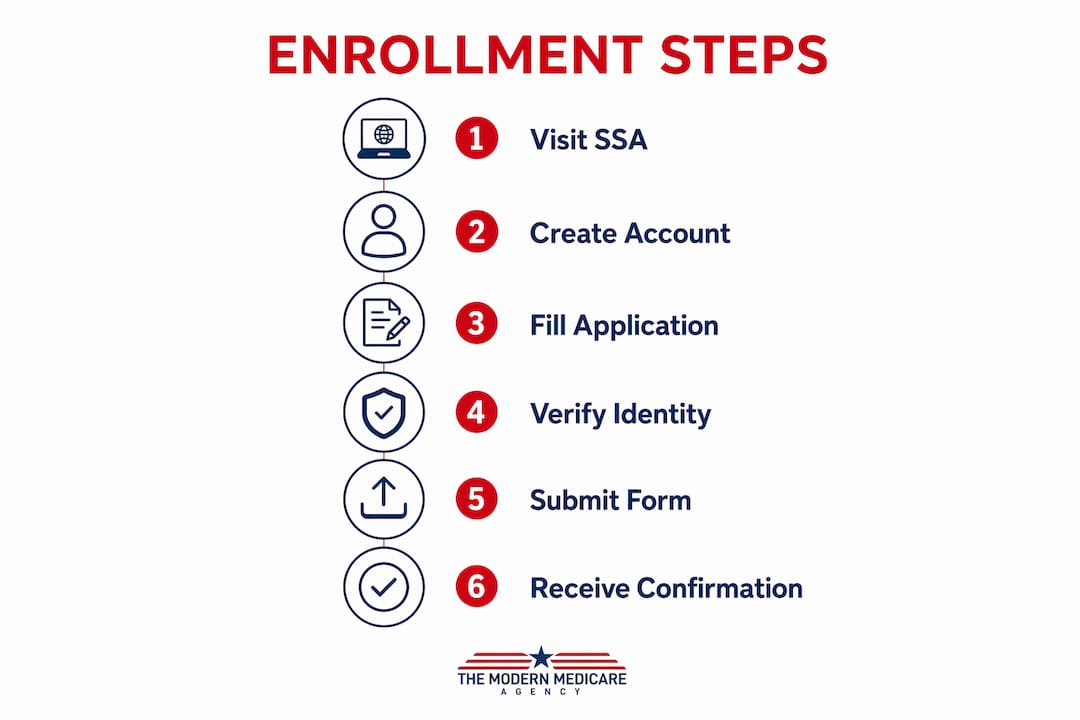
The online enrollment process at SSA.gov is the fastest way to get your application submitted. Here’s exactly how it works.
- Create your “my Social Security” account. Go to ssa.gov and select “Create an Account.” You’ll verify your identity using your Social Security number, email address, and a one-time security code. If you already have an account, simply log in.
- Answer eligibility questions. The system will ask about your age, citizenship status, and whether you’re currently receiving Social Security retirement or disability benefits.
- Verify your identity online. SSA uses Experian to cross-check your personal information against credit and public records. Have your address history and financial account details handy.
- Select your coverage. Choose Part A and Part B together, or Part A alone. If you’re still working and covered by an employer plan, you may want to delay Part B.
- Apply for financial assistance. If you qualify for Extra Help with Part D costs or Medicare Savings Programs, you can apply in the same session.
- Submit your application. Review everything carefully before hitting submit. You’ll receive a confirmation number immediately on screen. Write it down.
- Check your application status. Log back into your “my Social Security” account at any time to track where things stand.
Once enrolled, managing your benefits moves to Medicare.gov, not SSA.gov. That’s where you’ll pay premiums, print your card, and review your coverage details.
Pro Tip: If you’re applying for Part B during a Special Enrollment Period because you had employer coverage after 65, you must submit form CMS-L564 documenting that prior coverage. Missing this form can delay your application or trigger a penalty.
Common mistakes that cost people coverage or money
Most enrollment problems are avoidable. These are the errors that show up most often.
- Missing the Initial Enrollment Period. Missing your Part B window can result in a permanent monthly penalty unless you qualify for a Special Enrollment Period due to active employer coverage.
- Assuming you’re automatically enrolled. If you’re not already receiving Social Security retirement benefits, automatic enrollment does not apply to you. You must actively confirm your status and apply.
- Skipping form CMS-L564 for Special Enrollment Periods. This is one of the most common delays. No form, no proof of prior coverage, no timely enrollment.
- Applying on Medicare.gov instead of SSA.gov. Medicare.gov cannot process new enrollment applications. You enroll through Social Security, then manage benefits through Medicare.
- Waiting too long to set up premium payments. Medicare Easy Pay automatic billing takes 6–8 weeks to activate. You must pay manually in the meantime or risk losing coverage.
- Not creating a “my Social Security” account early. Identity verification can take time if your records have discrepancies. Set up the account weeks before you plan to apply.
- Ignoring documentation requirements. Missing a birth certificate or employment coverage record can stall your application mid-process.
What to do before you turn 65
Getting ahead of your enrollment period makes the actual application much smoother. Here’s where to focus your energy.
- Check whether you’ll be automatically enrolled. If you’re already receiving Social Security retirement or disability benefits at least four months before turning 65, Medicare enrollment is automatic. If not, you need to apply yourself.
- Create your “my Social Security” account now. Don’t wait until the month you turn 65. Account setup can hit snags with identity verification, and you want those resolved early.
- Gather your documents. Birth certificate, proof of citizenship or legal residency, current health insurance cards, and employer coverage details if applicable.
- Understand your plan options. Original Medicare (Parts A and B) gives you broad provider access nationwide. Medicare Advantage plans bundle hospital, medical, and often drug coverage through private insurers, usually with network restrictions.
- Know your enrollment window. Your Initial Enrollment Period is a seven-month window tied to your 65th birthday. Mark the start date on your calendar.
- Research financial assistance programs. Extra Help and Medicare Savings Programs can significantly reduce your premiums and out-of-pocket costs. You can apply during enrollment.
- Compare premium costs. Part A is premium-free for most people who worked at least 10 years. Part B carries a standard monthly premium. Knowing these figures helps you budget before your coverage starts.
What happens after you submit your Medicare application
The process doesn’t end at submission. Here’s what to expect in the weeks that follow.
About two weeks after applying, you’ll receive a welcome package in the mail with your red, white, and blue Medicare card. Keep that card somewhere safe. You’ll need it at every medical appointment.
You’ll also receive a notice confirming your enrollment effective date. If anything looks wrong, contact the Social Security Administration immediately at 1-800-772-1213. Corrections are much easier to make before your coverage start date than after.
For premium payments, the fastest and most secure method is through your Medicare.gov account. You can pay by credit card, debit card, Health Savings Account card, or directly from a checking or savings account. If you prefer automatic payments, sign up for Medicare Easy Pay, but remember the 6–8 week activation window. Pay manually until you see the first automatic deduction confirmed.
How to create and use a MyMedicare.gov account
Your Medicare.gov account is separate from your “my Social Security” account. You create it at Medicare.gov/account/login using your Medicare number, which you’ll find on your Medicare card or in your Social Security benefit verification letter.

Once logged in, you can print or replace your Medicare card, review your claims history, check your deductible status, and set up or manage premium payments online. The account also lets you compare Medicare Advantage and Part D plans during open enrollment periods. Think of it as your permanent dashboard for everything Medicare-related after your initial enrollment is complete.
How identity verification works during online enrollment
SSA’s online system verifies your identity in real time using a combination of your Social Security number, personal history questions, and a one-time passcode sent to your phone or email. The system cross-references public records through a third-party service. If verification fails online, you won’t be locked out permanently. You can call SSA at 1-800-772-1213 or visit a local office to complete the process in person.
How to choose between Original Medicare and Medicare Advantage
Original Medicare lets you see any doctor or hospital in the country that accepts Medicare, with no referrals required. You pay a deductible and 20% of most costs after that, with no out-of-pocket maximum unless you add a Medigap supplement.
Medicare Advantage plans are offered by private insurers approved by Medicare. They typically include Part D drug coverage and extras like dental and vision, but they restrict you to a network. The right choice depends on your health needs, budget, and how much you value provider flexibility.
How to add Part D or Medigap coverage after enrolling
Part A and Part B are just the foundation. Most people need more.
Part D covers prescription drugs. You enroll through a private insurer during your Initial Enrollment Period or a Special Enrollment Period. Delaying Part D when you don’t have other creditable drug coverage triggers a permanent penalty. Compare plans at Medicare.gov using your specific medications. For a full breakdown, the Part D coverage guide at Paulbinsurance walks through plan comparison step by step.
Medigap (Medicare Supplement) fills the gaps Original Medicare leaves, covering deductibles, coinsurance, and in some cases foreign travel emergencies. You apply directly through a private insurer. Your best window is the six-month Medigap Open Enrollment Period that starts the month you’re both 65 and enrolled in Part B. During that window, insurers cannot deny you coverage or charge more based on health conditions.
What confirmation to expect after completing your enrollment
Immediately after submitting your application online, SSA displays a confirmation screen with a reference number. Screenshot it or write it down. You can also log back into your “my Social Security” account to check your application status at any time.
Your welcome package and Medicare card arrive by mail about two weeks after you submit your application. Shortly after, you’ll receive a Medicare Premium Bill (form CMS-500) if you owe Part B premiums. That bill is your cue to set up payment through your Medicare.gov account or enroll in Medicare Easy Pay.
Paulbinsurance helps you make sense of what comes next

Getting enrolled is step one. Choosing the right coverage on top of Parts A and B is where most people get stuck, and where a wrong choice can cost real money for years. Paulbinsurance is a team of independent Medicare agents who specialize in exactly this. Principal agent Paul Barrett has been helping Medicare consumers since 2007, and the team’s approach is education first: you understand your options before you decide anything.
Whether you’re weighing Original Medicare against a Medicare Advantage plan, trying to figure out which Medicare Supplement plan covers your gaps, or sorting out Part D drug coverage, Paulbinsurance works with you at no cost to you. Independent agents aren’t tied to one carrier, so the recommendation you get reflects your situation, not a sales quota.
Talk to a Paulbinsurance agent today and get clear on your coverage before your enrollment window closes.
Key Takeaways
You enroll in Medicare Parts A and B through the Social Security Administration at SSA.gov, then manage all benefits, premiums, and plan changes through your Medicare.gov account after enrollment.
| Point | Details |
|---|---|
| Enroll through SSA, not Medicare.gov | Submit your Part A and Part B application at SSA.gov using your “my Social Security” account. |
| Initial Enrollment Period is seven months | The window opens three months before your 65th birthday and closes three months after. |
| SSA mails your welcome package and Medicare card about two weeks after you submit your application. | |
| Medicare Easy Pay takes 6–8 weeks to activate | Pay premiums manually through your Medicare.gov account until automatic billing confirms. |
| Paulbinsurance guides your coverage choices | Independent agents at Paulbinsurance help you choose supplements, Advantage plans, and Part D at no cost to you. |